
You don’t need to know whether you’ll become a quilter, a dressmaker or the person everyone brings broken zippers to. A good first sewing machine gives you enough control to learn—and enough useful features to make things you actually want.
The Brother CS7000X is our best sewing machine for most beginners. We’d pay for its speed limiter and needle-position control before paying for hundreds of decorative stitches. If the budget is tighter, the Brother XM2701 covers the essentials with simple dials. The Janome Arctic Crystal is another appealing mechanical option, provided you’re happy learning its front-loading bobbin.
The first machine we’d buy
Brother CS7000X—a useful balance of learning controls and accessories. Start with a straight seam today; keep the table and quilting feet for the projects you grow curious about later.
Which beginner sounds most like you?
| Your priority | Our pick | Why choose it? |
|---|---|---|
| “I’d like help controlling the speed.” | Brother CS7000X | Separate speed limiter and needle positioning |
| “I want the essentials and money left for fabric.” | Brother XM2701 | Simple dials, top-loading bobbin and one-step buttonhole |
| “I like mechanical controls and can learn the setup.” | Janome Arctic Crystal | Adjustable stitch length, clear dials and model-specific tutorials |
These links are for US models. Check the seller, voltage, returns and included accessories before buying, especially outside the US. Compare the actual packages: prices and bundles change.
Brother CS7000X
Best first machine for most beginners
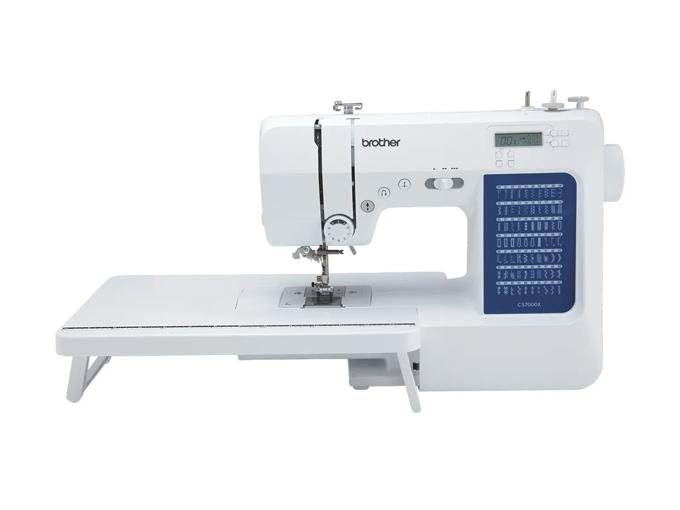
Your first seam has enough going on already. You’re watching the edge of the fabric, trying to keep it straight and wondering how much pressure to put on the pedal. A speed limiter takes one of those decisions down a notch.
That’s why the CS7000X leads our shortlist. Set a comfortable maximum speed and practice guiding the fabric. The needle-position button helps you stop with the needle down for a corner, raise the foot, pivot and carry on. These controls have a use on an early project; you won’t need to wait until you’re an expert to appreciate them.
The accessory package is generous in useful ways. You get a wide table, walking and quilting feet among ten included feet, and seven one-step buttonhole styles within the 70-stitch selection. If patchwork catches your eye, you can explore it without immediately shopping for a second batch of accessories.
We’d choose this over the cheaper XM2701 when the price difference is manageable. Spend the extra for the controls and package, though. Most first projects will use a tiny fraction of those stitches.
The limit to know: presser-foot pressure is fixed. That needn’t stop a beginner making useful clothes and home projects, but frequent work with demanding fabrics may eventually make adjustable pressure attractive. The extension table supports a quilt; it doesn’t enlarge the opening beside the needle.
Explore the Brother CS7000X specifications and included accessories
Brother XM2701
Best for a straightforward start on a tighter budget
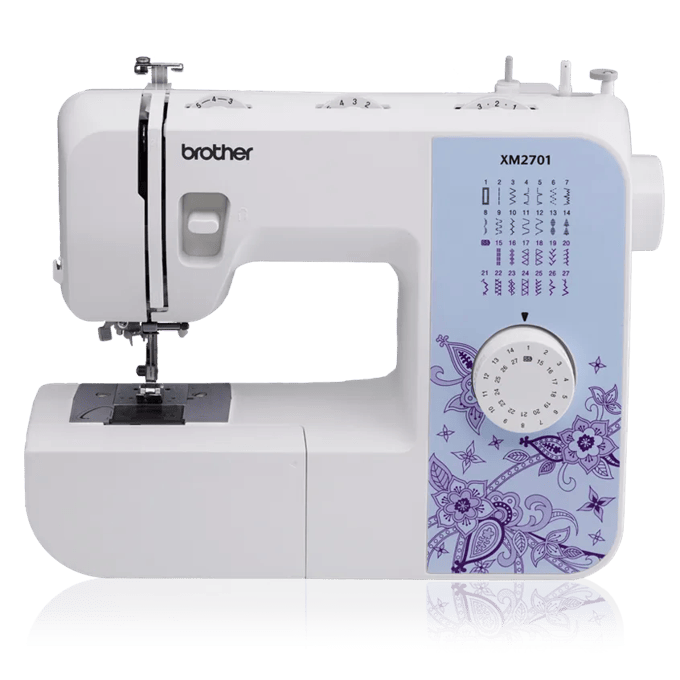
If your first wish list is a tote bag, some cushion covers and a few repairs, the XM2701 is an easy machine to make a case for. It has the everyday essentials without asking you to fund every possible future hobby.
Stitch selection is a dial. The 27 stitches include a one-step buttonhole, and the six supplied feet cover jobs such as zippers and blind hems. The automatic needle threader and top-loading bobbin are welcome conveniences at this end of the market.
We like it for the beginner who finds dials reassuring and would rather spend the saving on a lesson or a fabric they love. Those can contribute more to getting started than an impressive stitch count.
There is an important trade-off: the pedal controls the speed, with no separate limiter. If slow starts are what worry you, try the controls before buying or choose the CS7000X. A mechanical machine can be simple to understand while still taking practice to control.
The XM2701 also has fixed presser-foot pressure. We’d use it as a general starting point for everyday fabrics, rather than buying it specifically for thick jeans seams or a roomful of upholstery projects.
Explore the Brother XM2701 specifications and included accessories
Janome Arctic Crystal
Best colorful mechanical option
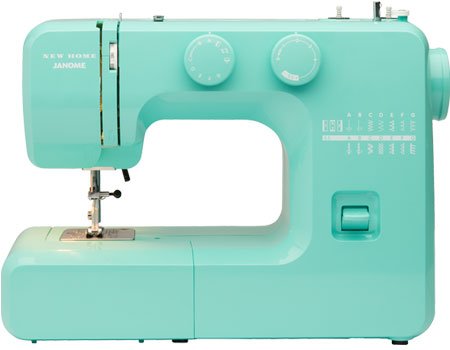
The Arctic Crystal is for someone who wants a conventional dial machine and wouldn’t mind a little turquoise on the sewing table. The color is enjoyable; the more useful details are adjustable stitch length, a free arm and a set of stitches that covers ordinary sewing jobs.
There are 15 stitches and a four-step buttonhole. Four-step means you move through the buttonhole stages yourself, so we’d favor either Brother if one-step buttonholes are high on your wish list.
The bigger decision is the bobbin. You load it into a separate front-loading case, and there’s no built-in needle threader. Neither is a reason to rule the machine out, particularly if the person teaching you knows this arrangement well. They are extra steps to understand, and we’d want a demonstration before choosing it purely for its looks.
Janome provides an illustrated guide and video tutorials for the Arctic Crystal. Seeing the setup before ordering is a useful way to decide whether the controls suit you.
Like the XM2701, it has pedal-controlled speed without a separate limiter. We’d choose it when its controls, support and price are a better fit for you; we’d keep the CS7000X at the top of the list for someone seeking more help with the learning pace.
Explore the Janome Arctic Crystal specifications and included accessories
The features worth paying for on your first machine
A comfortable way to sew slowly
Try sewing a short line, stopping at a mark and starting again. If the machine keeps taking off faster than you intended, a speed limiter is worth considering. A high top speed tells you little about how comfortable the first few stitches will feel.
A bobbin system you can understand
The bobbin supplies the lower thread. A top-loading system places it under a cover on the sewing bed; the Janome here uses a removable case at the front. Both are learnable. We’d choose the one you can confidently thread, remove and put back.
Be skeptical of “jam-proof” promises. Correct threading, the right bobbin and routine cleaning still matter. An automatic needle threader only helps pass thread through the needle’s eye; it doesn’t thread the whole machine or set the tension for you.
Useful stitches and adjustable settings
A straight stitch and zigzag will take you a long way. Add a buttonhole for garments and adjustable stitch length so you can follow different project instructions. Built-in lettering and decorative borders are lovely if you want to use them, but they wouldn’t be our first upgrade.
All three machines here use manual upper-thread tension adjustment. Learn the normal starting setting from the manual and test on a scrap. Computerized stitch selection doesn’t automatically mean automatic tension.
Help you can reach
Before spending more, compare a dealer’s package with the online offer. A setup lesson and somewhere to ask a threading question can be valuable, especially when you’re learning alone. Read the seller’s returns and service arrangements for the exact model.
Give yourself a friendly first project
We’d start with a simple tote or an envelope cushion cover in woven cotton. You get manageable pieces, plenty of straight sewing and something useful at the end. A slinky blouse can wait until you’ve learned how the machine feels.
Allow for thread, suitable needles, the correct bobbins, fabric scissors, a seam ripper and a way to mark and measure. Check the included accessories before buying duplicates. You can add specialty feet once a project gives you a reason.
For the first practice session, work through this small sequence:
- Thread the machine using its own guide. Similar-looking machines can have different paths and bobbin instructions.
- Test a straight seam on scrap fabric. Practice starting, stopping and reversing before cutting into the project fabric.
- Turn a corner. Stop with the needle down, raise the foot, turn the fabric and lower the foot before sewing again.
- Inspect both sides. If something looks wrong, pause and check the threading and setup before turning several adjustment dials at once.
See what starting a seam involves. This Brother basic-sewing video is included in the CS7000X support tutorials. The demonstration covers a machine family, so the panel and stitch numbers may differ from your model.
When we’d choose a different first machine
You mainly want to repair jeans or sew canvas. Start with our denim sewing machine guide. It explains the seam-handling controls and accessories we’d consider, along with the limits of domestic heavy-duty models.
You want embroidered names and designs. A conventional machine’s decorative stitches aren’t hoop embroidery. Our embroidery machine guide explains what to buy and why the embroidery area matters.
You’re buying for a child. Read our children’s sewing machine guide for supervised learning, finger-guard options and setting up a manageable first session.
You’re certain you’ll sew regularly and have more to spend. Try machines with adjustable foot pressure and other controls suited to your chosen fabrics. Our full home-sewing shortlist includes more specialized upgrades. You can buy a capable machine as a beginner without buying every advanced feature available.
Questions before ordering
Is mechanical or computerized better for a beginner?
Choose the controls that help you. Mechanical dials are easy to see and explain; a computerized machine can add a useful speed limiter and needle-position button. The label alone doesn’t settle which will be easier for you.
Will I outgrow a basic machine quickly?
You can make a great many useful things with straight stitching, zigzag and a buttonhole. We’d upgrade when a repeated task becomes awkward or you need a specific capability, rather than because you’ve finished an arbitrary number of projects.
Should I buy a used machine?
A serviced machine from a dealer can be a sensible first buy if you can try it, obtain the manual and get help afterward. Include any missing pedal, feet, bobbins or service costs in the comparison. A very cheap untested machine can turn your first sewing lesson into a repair project.
What about the Brother CS6000i in older guides?
If you already have a working CS6000i, learn on it. For a new purchase, we’ve centered this guide on current product listings and the CS7000X package. Don’t pay extra for an older model simply because it was recommended in a guide years ago.
Still undecided? We’d choose the CS7000X if the budget allows it. The XM2701 is a sensible way to spend less, and the Arctic Crystal is worth trying if you prefer its setup. Then choose a fabric and make the first thing. The shopping can stop before you’ve planned your entire sewing future.
About our selections
We compared manufacturer specifications, manuals, accessory packages and current Amazon listings. Our priorities were usable learning controls, clear setup and useful first projects, rather than the largest stitch collection. This is a research-led guide; the recommendations are our editorial judgment. Product information and links checked September 5, 2026.